


How To Book
That's Sew Austin offers booking options for both Subscription Members
and Non-Subscription Members.
Please Read
🚨
Please Read 🚨
All payments are nonrefundable but may be rescheduled or applied as credit toward Studio Time Blocks. For full details, please review our Cancellation and Booking Policy.
Please Read
🚨
Please Read 🚨
For Subscription Members:
Purchase Your Membership
Choose the Membership plan that best fits your needs.Check out our Studio Memberships here.
Login or Sign up
Create an account or login with your existing account. (NOTE: If you try to reset your password and do not receive an email you may not have an account. If you do not login to your account, it will not track your bookings. The system will see you as a guest checking out.)Receive Your Code
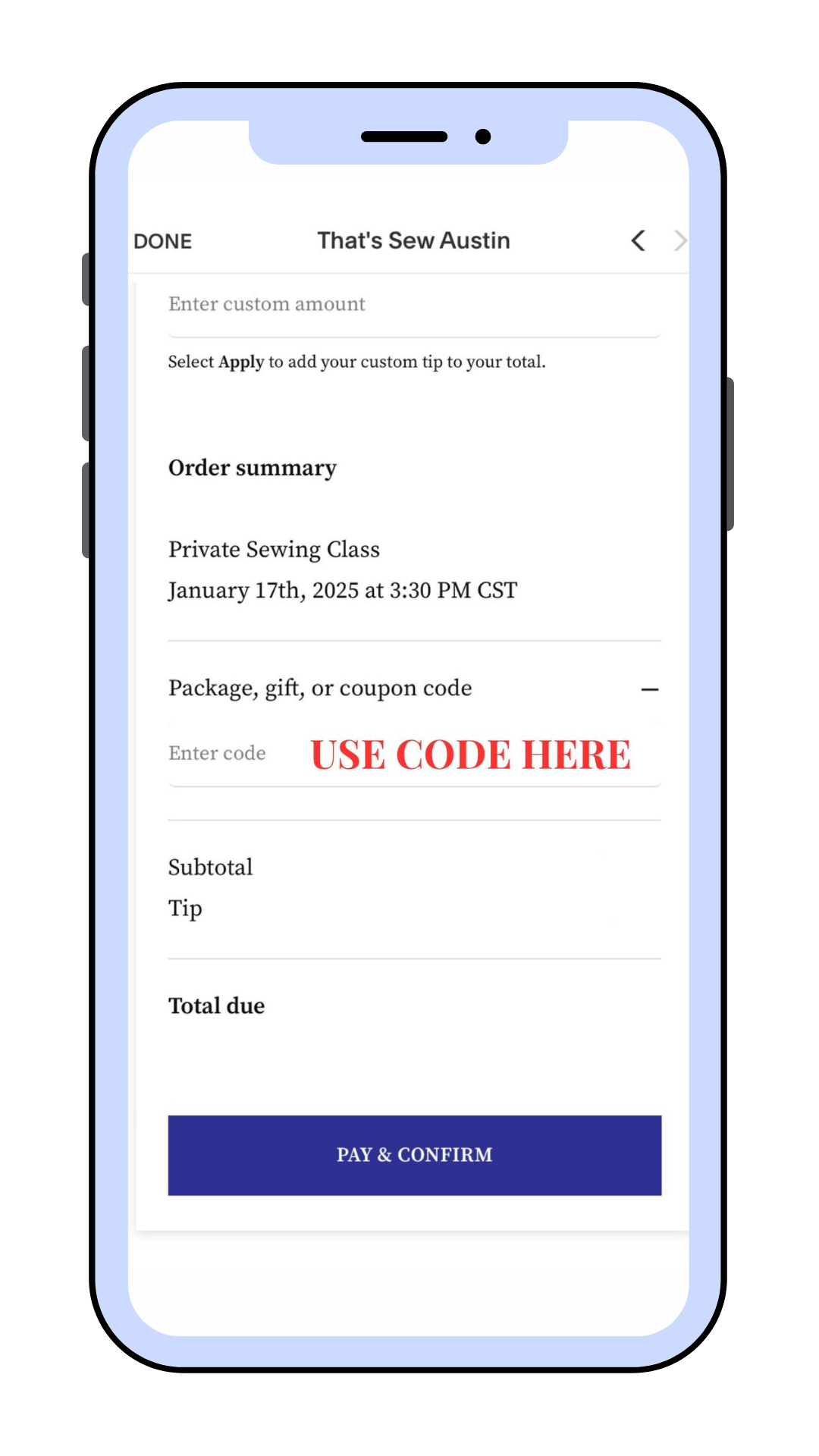
After your membership purchase, you received a randomly generated CODE displayed on the confirmation page and emailed to you.Redeem Your Time Block
Use your CODE during checkout to book your time blocks and enjoy the flexibility of redeeming them immediately or over time. You must click APPLY for your code to remove the associated price. Please ensure that the code was applied and the balance is zeroed out, as we do not do traditional refunds. (see cancelation policy linked above)Tips
Although tipping is wonderful and greatly appreciated, it is not required.Track Your Membership
As you book, the time blocks you redeem will be deducted from your Membership balance. Use our booking portal to easily track and manage everything in one place.
Important for Subscription Members:
If you are a Subscription Member, remember to use your CODE when booking to redeem your time blocks!
For Non-Subscription Members:
Login or Sign up
Create an account or login with your existing account. (NOTE: If you try to reset your password and do not receive an email you may not have an account. If you do not login to your account, it will not track your bookings. The system will see you as a guest checking out.)Choose Your Time Block and your Time Slot
Select the time and service that works best for you.Complete Your Booking
Follow the prompts and enter your payment information to confirm your reservation—no code needed.Tips
Although tipping is wonderful and greatly appreciated, it is not required.

FAQs
-
Members have 12 hours before their scheduled appointment to notify That’s Sew Austin if they need to cancel or reschedule. If a member cancels or reschedules after this 12-hour window, they will be charged the full price of the scheduled appointment or must use one of their credits.
If That’s Sew Austin has to cancel or reschedule an appointment, members will be notified at least 12 hours in advance, and the appointment will be rescheduled as soon as possible.
-
If a member arrives more than 15 minutes late, their appointment may be shortened to fit the remaining time, but the full session fee will still apply.
If the member is more than 30 minutes late, the session will be considered a no-show and will be forfeited without a refund or credit. -
If a member fails to attend their scheduled appointment without prior notice, they will forfeit the session and will not receive a refund or credit.
-
In the case of an emergency beyond one’s control, That’s Sew Austin will apply the payment or credit toward the next appointment or reschedule accordingly. Each member is allowed up to three emergency-based reschedules per year.
-
All refunds will be issued as credits. Credits do not roll over and expire at the end of the listed date.
-
Teachers set their own schedules, and availability is subject to change. The app shows their current openings, though updates may take a few minutes to sync. There will always be a teacher available during standard studio hours unless we’re closed for a holiday. If anything looks off, you can reschedule or submit a Booking Issue Form on our Member Support Page.